The website
usesoba.xyz is the glasses' companion, where you connect apps, see everything at once, and set what the lens does.
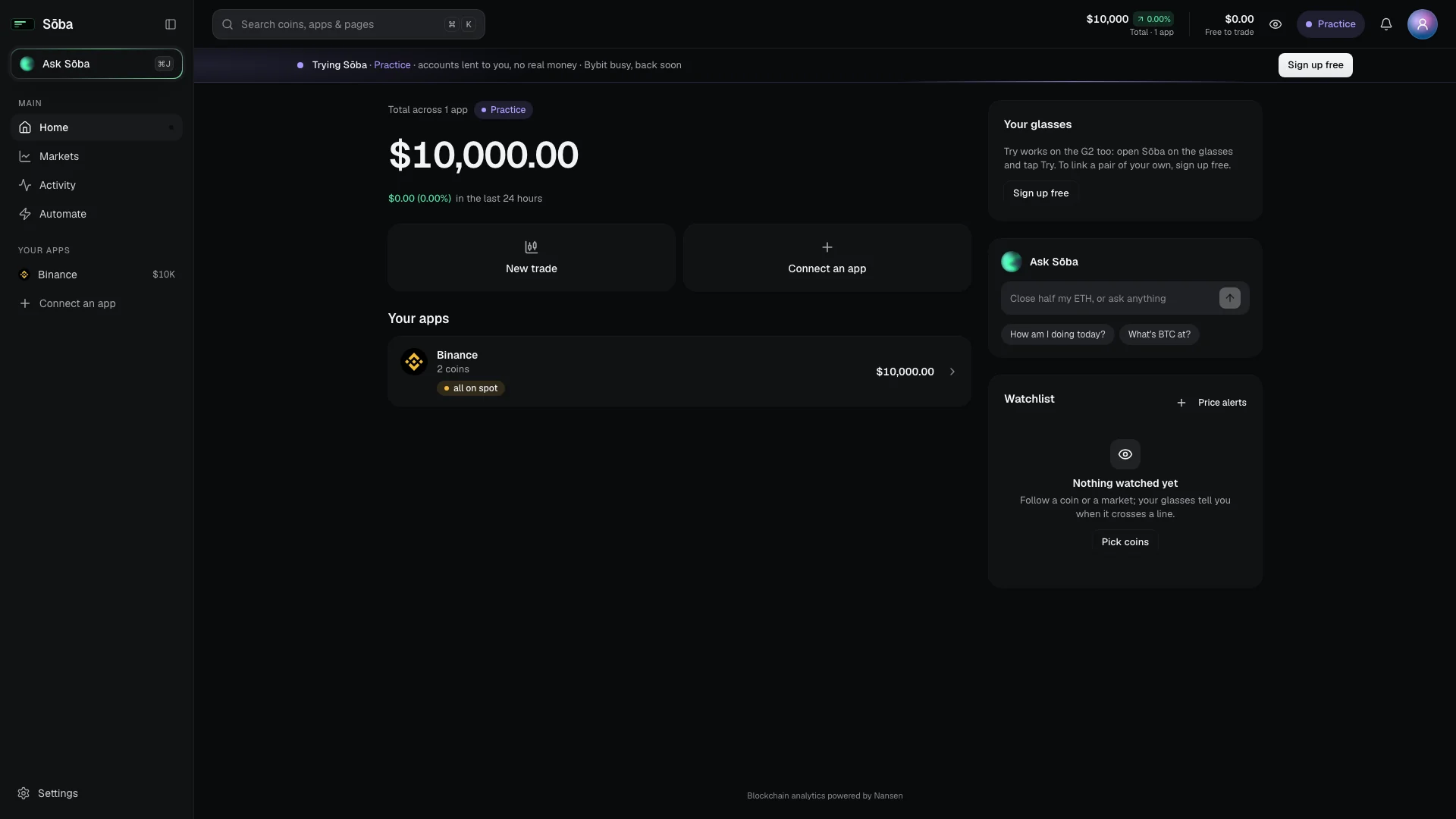
The frame around every page
| Part | What it holds |
|---|---|
| Sidebar | Ask Sōba (⌘ J) → MAIN: Home, Markets, Activity, Automate → YOUR APPS: each connected app with its value, largest first, and Connect an app → Settings. ⌘ B folds it to icons. |
| Top bar | Search (⌘ K: pages, apps, coins and markets, actions), Total · N apps and Free to trade, hide balances, the Real / Practice pill, the alerts bell (latest 8, Pause 15 min), your account |
| Live | A socket keeps balances (every 2 s at most), alerts, the glasses' mirror and Activity current; if it drops: "Live updates paused, reconnecting…" |
| On a phone | A tab bar: Home · Markets · the Ask orb · Activity · Apps |
Home
| Part | What it shows |
|---|---|
| Total | "Total across N apps", the live value, "+$X (Y%) in the last 24 hours" |
| Needs you | Positions within 10% of liquidation with no stop (Protect it), logins that can't trade, won bets (Claim), login warnings. Hidden when empty. |
| New trade · Connect an app | Two tiles |
| Set up Sōba | Link your glasses → Connect an app → Add money → Watch a coin → Connect Telegram, with a progress bar. Stays until done. |
| Your apps | One row per app: "3 positions · 1 bet · 4 coins · 2 orders waiting", value, open P/L, and a pill when it can't trade |
| Right rail | Your glasses (a live mirror of the lens, or a QR to link), Ask Sōba, Watchlist |
One page per app
Each connected app has its own page, /app/<app>, with tabs by kind:
| Kind | Tabs |
|---|---|
| Hyperliquid, Binance, Bybit, OKX | Positions · Orders · Wallet · Earn · History · Settings |
| Polymarket | Bets · Orders · Claim (when a bet won) · History · Settings |
| Gram Wallet, Trust Wallet | Coins · Earn · History · Settings |
| Coinbase | Coins · History · Settings |
A position opens a sheet with its numbers (P/L, size, entry, mark, leverage, liquidation, stop, target) and Act on it: close presets, margin (isolated), stop, a target (Hyperliquid; on exchanges, set targets from the lens or the app), leverage, each through a read-back. Add money shows where the money is and the right way in: a move inside the app, a practice top-up, a deposit address with a QR (Sōba watches 30 min for it to land), or the app's own page.
Activity
Everything Sōba did and saw, grouped by day: filters Everything, Trades, Swaps, On-chain, Alerts, Shortcuts, App changes, an app menu and search. Wallet transactions from the last 90 days sit beside Sōba's own rows. Each row opens its detail: result, amount, what you said, the app's receipt, status, time.