The lens
Your trading day on a 576 × 288 green display, four lines at a time, with every screen telling you what a tap does.
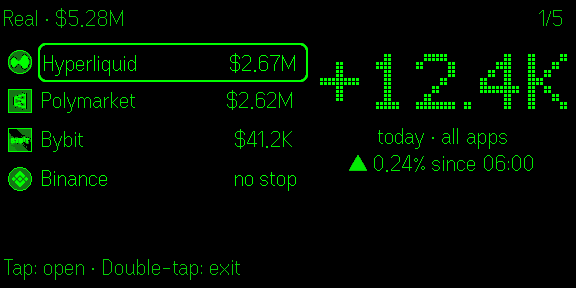
Sōba's plugin runs inside the Even App on your phone and draws on the G2's lens: 576 × 288 pixels per eye, green on black. A page holds a header, four body lines and a hint. That is the whole screen, so every word on it earns its place.
Lens 3.0 adds pictures beside the words: dot-matrix digits, rings, bars, charts and app logos. Each picture has a text twin. If the glasses refuse an image, the same screen comes back as plain text for 60 s.
Read any screen
| Part | What it says | Example |
|---|---|---|
| Header, left | The screen's title and the network | Real · $5.28M, Bybit · Practice, Try · Practice |
| Header, right | How old the numbers are, or the page | now, 5s, 1m, 1/5 |
| Freshness | Words, not guesses, when data is late | STALE after 15 s, OFFLINE after 45 s or when the socket is down |
| Body | Four lines; lists show 4 rows a page with a 1-4/9 label | ▶ BTC long 6x · −$222 · stop $59,307 |
| Hint (last line) | What Tap does here, and the way back | Tap: open · Double-tap: exit |
| Waiting frames | A blinking ▲N when an alert waits behind a busy screen | ▲2 |
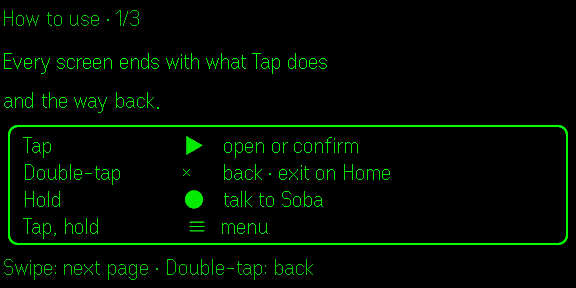
Every screen ends with what Tap does and how to go back. On a screen that can send money, the way back is always on it.
The gestures
Tap, then hold opens the Even menu, which Sōba fills with Home, New trade, Activity, Ask Soba, Pause alerts and the Real/Practice switch. See The menu.
Where things are
| You want | Go |
|---|---|
| How am I doing, and what's at risk | Home and your apps |
| Open, close or protect a position | Trade from the lens |
| See exactly what a tap will send | The read-back |
| Know when to look | Alerts and While away |
| Just say it | Voice |
| Switch Real/Practice, pause alerts, link | The menu |