The menu and linking
Tap, then hold for the Even menu (Home, New trade, Activity, Ask Soba, Pause, Real or Practice) and link a pair with an eight-character code.
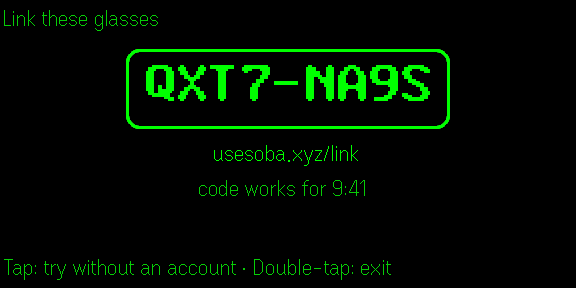
Link a pair
Open Sōba on the glasses. The lens shows an 8-character code (no 0, O, 1, I or L, so it can't be misread) and usesoba.xyz/link.
On your phone or computer, open usesoba.xyz/link, sign in, type the code and press Link these glasses.
Within a few seconds the lens fills with your Home. The pair keeps its own session, so unlinking one pair never touches another.
A code lasts 10 minutes and quietly renews itself. Live, the screen reads Link · usesoba.xyz/link · QXT7 NA9S, Try · tap · practice, no sign-up and A new code every 10 min, with no countdown; before the code arrives, it reads Link · getting your code.... The linking itself follows the standard device-code flow (RFC 8628): the plugin only shows the code and receives a session, so no password or key ever touches the glasses.
Try without an account. On the code screen, Tap lends you Sōba's practice accounts: no sign-up, no real money. The header then reads Try · Practice, and the menu offers Link my glasses when you're ready.
The Even menu
Tap, then hold opens the Even menu. The Even OS draws it; Sōba fills it, in a fixed order: where to go, then actions, then switches, then help.
| Your state | Items, in order |
|---|---|
| Linked | Home · New trade · Activity · Ask Soba · Pause alerts 15 min (or Resume alerts) · Switch to Practice (or Switch to Real) · How to use |
| Trying Sōba | Home · New trade · Activity · Ask Soba · Pause alerts 15 min (or Resume alerts) · Link my glasses · How to use |
| On the code screen | Try Soba · How to use |
| Offline | How to use |
| Item | Does |
|---|---|
| Home | Back to Home. A proposal on screen isn't skipped; it stays in Activity |
| New trade | Starts New trade in the app you're looking at, or a chooser |
| Activity | Opens over the current screen |
| Ask Soba | Tap to talk; tap again to finish (Voice) |
| Pause alerts 15 min | Pauses alerts everywhere: lens, website and Telegram |
| Switch to Practice / Real | Runs on the server, so the lens and the website switch together |
| How to use | The three help pages |
| Try Soba / Link my glasses | Starts or ends a Try session |
The phone page
Inside the Even App, Sōba's own page mirrors the lens. Before linking it shows the code and a link to finish in the browser. Once linked it has:
| Part | What it does |
|---|---|
| Apps | Your apps, with the Real / Practice switch |
| Alerts | One switch for alerts |
| Shortcuts | A switch per shortcut |
| Mirror | Exactly what's on the lens right now |
| Glasses | Worn, off or in the case |
| Unlink | Unlinks this pair, after a confirm |
The menu holds no money commands. Protecting or closing several positions at once is one read-back you reach from an app's Protect N without a stop row, Needs you, or a shortcut. Unlinking lives on the phone page, not the lens.