Home and your apps
One glance answers "how am I doing?" across every app, with the riskiest thing first and each app's home one tap away.
Home
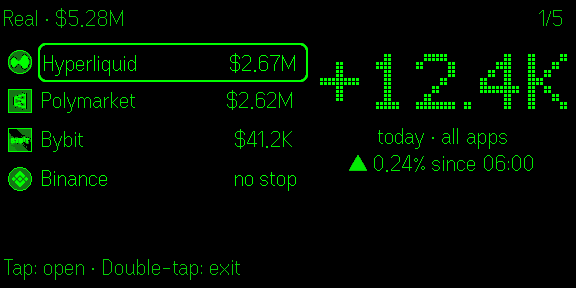
Home is where the plugin opens. Its header reads like Real · $4.73M · today +$212K. With one app it reads that app's own line, like Hyperliquid · Real · $9,963 · today +$12.
| Row, in order | When it shows | Tap |
|---|---|---|
Alerts paused · resume | While alerts are paused | Review the resume |
| Needs you | Only when something is urgent | Open the list |
| Each connected app | Always (with one app, its own rows sit right on Home) | Open the app's home |
| Watchlist | Always | Open it |
| Activity | Always | Open it |
| More | Always | Open it |
On Lens 3.0, today's P/L (or the total) sits on the right in dot-matrix digits, with today · N apps and N need you or nothing urgent under it. Each app row carries the app's logo. A holding row can carry a text sparkline of eight block glyphs (▁▂▃▄▅▆▇█).
With no apps connected Home says No apps connected / Connect one at usesoba.xyz/app. If your apps are all on the other network, it says how many are there and points to Menu → Switch to Practice (or Real).
Needs you
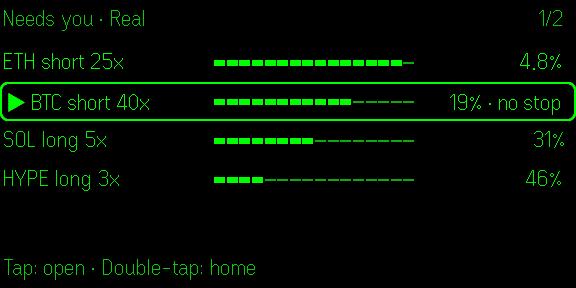
One list, in order of harm, across every app. Each row opens its fix. The hint reads Tap: fix · Double-tap: back.
- Positions near liquidation with no stop
- Approvals or keys that have gone
Protect N without a stop · AppClaim $X · App(won bets)- Shortcut proposals waiting for your answer
- Trade calls waiting
An app's home
Every connected app has its own home, headed like Hyperliquid · Real · $9,963. Rows run top to bottom:
| Row | What it is |
|---|---|
Claim $X | Won Polymarket bets. Tap opens that app's winnings and sends the claim link to Telegram, which opens the website's Claim tab for your wallet |
| The reason it can't act, or the money row | e.g. Trading is off (Tap: why) |
| New trade / New bet / Send or swap / Buy or sell | Perps apps / Polymarket / wallets / Coinbase |
Get practice money | Practice top-up, where the app has one |
Protect N without a stop | One read-back that stops every unprotected position |
| Holdings | Riskiest first |
| Coins | |
Swap or move | |
Orders (n) | Resting orders, each with a Cancel read-back |
| History | This app's activity only |
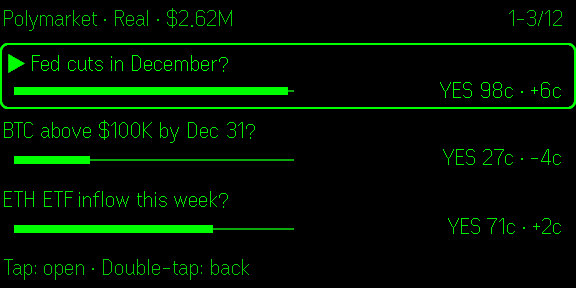
On Lens 3.0 a perps app draws a segmented bar per position: 16 cells, fuller the closer it is to liquidation, empty at 50% away, with a no stop tag. Polymarket draws an odds meter per bet:
More
More holds Apps, Today, Accounts, then Trade calls and Earn (when you have them; Earn puts money in and takes it out, 25%, 50% or All, each through a read-back), Shortcuts, Glasses and How to use. An item shows only when it has something in it. The hint reads Tap: open · Double-tap: home.
- 1More ▸ Apps
 SwipeMove along the strip; Tap opens that app
- 2More ▸ Today
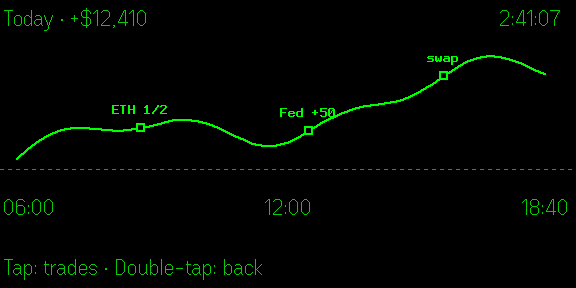 TapOpens Activity
- 3More ▸ Accounts
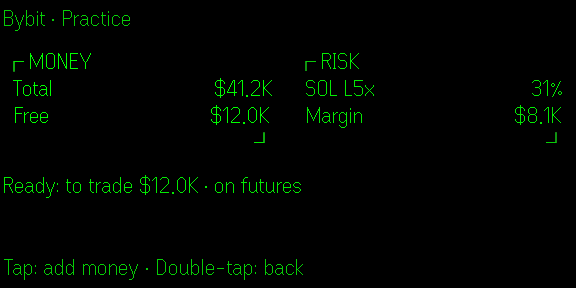 SwipeNext app
- 4Watchlist (on Home)
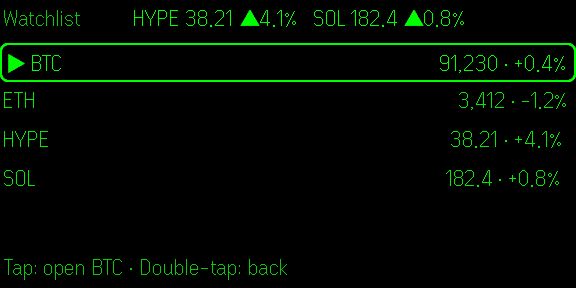 TapA coin opens its New trade; a bet opens its card
| Page | Shows | Tap |
|---|---|---|
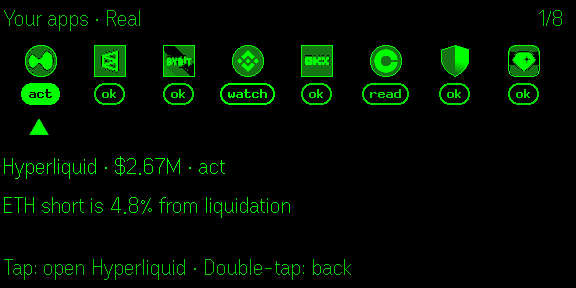
Apps (Your apps) | Each app's 32 px logo with a state pill (ok, act, off, or ... while its balances are still being read), a ▲ under the chosen one, its money and holdings | Open that app |
| Today | Today +$212K, the last day's P/L as an arc (up to 48 points) over a dotted zero line, 3 time ticks | Activity |
| Accounts | Per app, in bracketed panels: Money (Total, Ready to trade) and Positions (Open with P/L, Risk: the nearest liquidation and how many have no stop) | Open that app |
| Shortcuts | Each shortcut with ■/□ and its whole rule, 2 a page | Nothing: switch them on the phone page or the website |
| Glasses | Linked to <email> / Since <date> / Unlink on the phone page | |
| How to use | Three help pages with the gesture legend | |
| Watchlist (on Home) | Coins as BTC · $63,050 · +2.1%, a ticker line of every coin's move, bets and markets | Coin → its New trade |
The frames above come from a sample account, and some of what they show isn't drawn live: on a live account the Today arc carries no trade marks yet, the Apps strip's pills read only ok, act, off or ..., and Accounts shows Money and Positions panels. The Shortcuts page on the lens is read-only. Add coins to the Watchlist, and edit shortcuts, on the website.