Alerts and While away
Liquidation warnings, big moves, odds swings, price lines and fills reach the lens when it is safe to look, and never over a review.
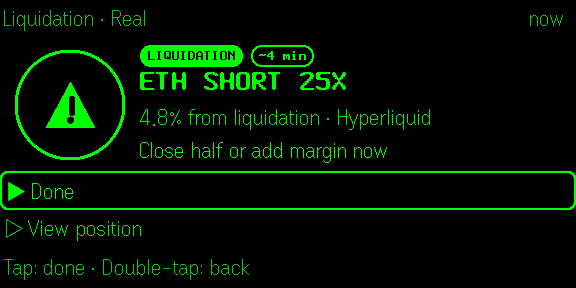
The kinds
| Alert | Title on the lens | Lines (example) | Second choice |
|---|---|---|---|
| Near liquidation (starter shortcut) | Risk (a danger card) | ETH short · 4.8% from liquidation / Rule: any position liq under 10% | View position |
| Big move (starter shortcut) | Price alert | BTC $63,050 · ▲3.1% in 60 min / Rule: a position’s price moves 3% in 1 h | View in Activity |
| Odds swing (starter shortcut) | Price alert | Yes 62¢ · +6¢ / Rule: any bet moves 10¢ | View position |
| Price line crossed (one-time) | Price alert | BTC rose above 70000 / Now 70,120 · one-time alert | View in Activity |
| Orders filled outside Sōba | Orders filled | 3 ETH orders filled outside Soba / Bought 0.0054 ETH · $9.12 in all | View in Activity |
The first three are the starter shortcuts every account gets: they only notify, and you tune or switch them off in Automate.
Alerts never carry trade buttons. To act, you open the holding and go through its own read-back. The safe choice (Done, Skip) is always selected first, and choices are marked ▶/▷ so they never read as plain text.
Shortcut proposals and calls
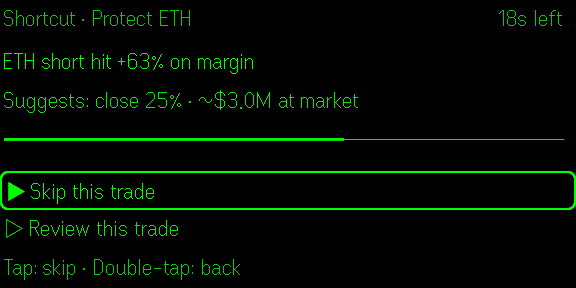
When a shortcut fires, the lens shows Skip this trade / Review this trade with the time left. Proposals at market last 30 s, others 60 s. Review opens the read-back; Back or Skip records it as skipped. When it runs out the lens says Request expired · nothing sent / Saved in Activity. If you handled it on Telegram, it says Handled elsewhere · see Activity.
A trade call from Telegram arrives the same way, with the Telegram logo: Skip this call / Review this call.
How a frame interrupts
| Rule | Value |
|---|---|
| Where it takes over | Only a passive screen: Home, an app, Needs you, a list, Detail, More, Activity, Accounts, Today… Never a review, Sending, a Result, voice or another frame |
| Otherwise | A blinking ▲N at the top right until you're free |
| Order | Risk warnings first, then proposals, then the rest |
| Tap guard | A frame ignores taps for 1 s after it is fully drawn |
| After it closes | The screen underneath holds for at least 2 s |
| Left alone | After 8 s the pointer goes back to Skip / Done |
| Fills | Batched, shown after 2 s idle and at most once a minute |
| The Even menu open | No repaints and no new frames until it closes |
Quiet rules
| Rule | Value |
|---|---|
| Pause alerts 15 min | From the menu, the phone page, the website or by voice. Nothing reaches the lens, the website's toasts or Telegram. Each alert is still logged in Activity as muted, and Home's first row reads Alerts paused till 14:47 with a resume row |
| Cooldown | The same alert at most once every 10 min |
| Liquidation re-arm | After it moves 3 points back out |
| Off your face, or in the case | Nothing is drawn. Proposals go to Telegram instead |
| Telegram copy | Every lens notice also goes to Telegram (when linked and not paused) |
While away
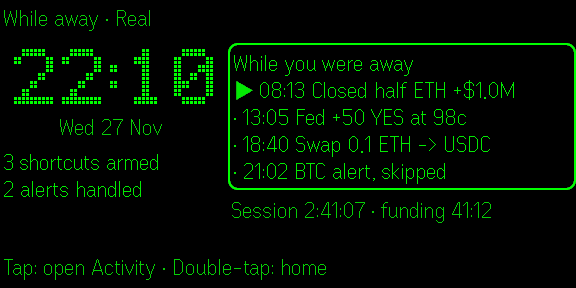
When you open Sōba, or put the glasses back on, While away lists what's new since you last looked: a dot-matrix clock, the date, how many things are new, a boxed list of times and events, and how long the session has run. Tap: activity opens the full list; Double-tap marks it seen.