Wallets
Gram Wallet and Trust Wallet on your glasses, where Sōba builds every send, swap and stake and your own wallet approves it.
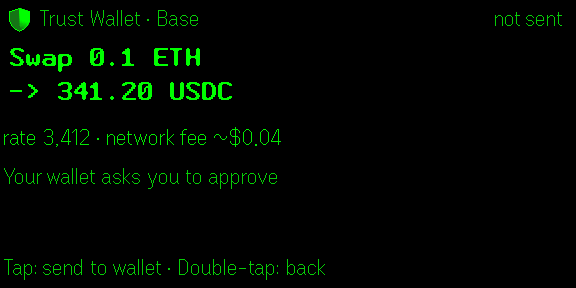
Sōba never holds a wallet key. It keeps only the connection session (TON Connect or WalletConnect), sealed on its server, so your glasses can ask your phone's wallet even with no browser open. Every move waits for you in the wallet.
Connect
| Gram Wallet | Trust Wallet | |
|---|---|---|
| Protocol | TON Connect | WalletConnect |
| How | Pick your wallet from the official list (Telegram's own wallet, Gram Wallet, Walt, Tonkeeper, MyTonWallet), scan the QR or tap Open Tonkeeper (or your wallet), then approve | Scan the QR or open Trust; "Trust may say it can't verify Sōba. That's expected." |
| Real | TON mainnet | Ethereum, Base, Arbitrum, Polygon, BNB Chain |
| Practice | TON testnet (Telegram's own wallet is Mainnet only) | Sepolia, Base Sepolia, Arbitrum Sepolia, Polygon Amoy, BNB testnet (testnets carry USDC only) |
When it's done Sōba says so in two chips: "Every send waits for you in Tonkeeper" (your wallet's name) and "Sōba can't move anything by itself". The WalletConnect session is extended daily, and ending it in the wallet ends it in Sōba.
What you can do
| Action | Gram Wallet | Trust Wallet |
|---|---|---|
| Read | TON and token balances, history, Tonstakers | Native coin, USDC and USDT on five networks; P/L and history (Nansen, Mainnets); Aave and Lido |
| Swap | TON ⇄ USD₮ through STON.fi Omniston (Mainnet only), at most 1% slippage | Through Uniswap, at most 0.5% slippage |
| Send | From the glasses: a saved contact's preset amount. From the website: any TON address. | From the glasses: a saved contact's preset amount. From the website: any 0x address. |
| Receive | The address in two lines and its network on the lens; Send it to Telegram delivers it as a QR card | Your wallet's address as a QR, with the networks it works on |
| Earn (Real) | Tonstakers stake and unstake | Aave USDC on Base, Lido ETH on Ethereum |
Each one is read back first, then your wallet asks you to approve it (once, or twice for a first swap: allow, then swap). Sōba watches for the transaction for 120 s after you approve.
Contacts: sends from the glasses
On a wallet's Settings tab, Contacts reads "Send from your glasses — each contact is one send on the lens". A contact is a name (up to 24 characters), an amount, an address and, for Trust, a network and coin; up to 12 per wallet. On the lens a contact becomes one row: read back, tap, approve in the wallet. In Practice the same contact sends on that network's testnet.
Alerts and P/L
For a Real Trust Wallet, Nansen supplies P/L, history and a wallet-move alert when $25 or more moves in or out ("Money moves in a wallet" in Automate). Balances refresh every 60 s.
Limits
Swaps on TON and Earn work in Real only. Trust swaps need the server's Uniswap key, and every wallet feature needs the website's WalletConnect project. P/L, history and wallet-move alerts cover Mainnets only.